
Word Counter
Free word counter and character counting tool with instant multilingual text analysis.
About
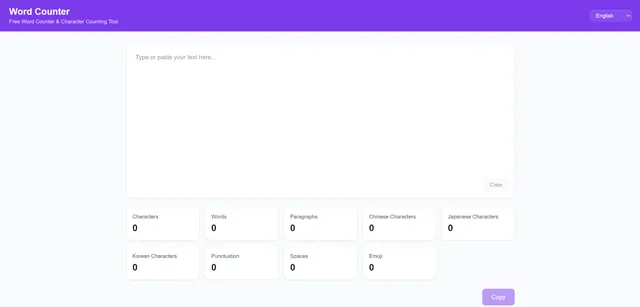
Word Counter is a word counter for fast, browser-based text analysis. Paste text into the page and it instantly reports counts for words, characters, paragraphs, punctuation marks, spaces, emoji, and language-specific scripts, including Chinese, Japanese, and Korean. The tool is designed to work locally in your browser, so your text is processed without a registration step and without sending the content through a login flow. It is useful when you need a quick word count, a character count, or a multilingual check before publishing, submitting, or editing copy.
What is Word Counter
Word Counter is a word counter built for instant text analysis in the browser. It presents itself as a free word counter and character counting tool, and it also measures paragraphs plus several text details beyond the basic totals. The app supports multiple languages and says it can count English words as well as Chinese, Japanese, and Korean characters.
Because it runs locally in the browser, Word Counter is positioned as a privacy-focused word counter for quick checks. There is no registration step, so you can paste text and review the results immediately. The tool is aimed at people who need a fast count rather than a document editor or a full writing suite.
Key features
Word Counter combines several checks in one place, which makes it more than a simple word counter.
- Instant counts for words, characters, and paragraphs
- Counts for punctuation marks, spaces, and emoji
- Language-aware support for English, Chinese, Japanese, and Korean
- Local browser processing for privacy-conscious use
- No login required before using the word counter
- Copy and clear controls for repeated checks
- Language switching for multilingual counting
The interface also shows statistics in two rows, separating basic counts from language-specific and special-element counts. That structure helps you scan the word counter quickly when you are editing a draft to a specific limit.
How to use it
Using Word Counter is straightforward, and the flow is built around the word counter input area.
- Open the site in your browser.
- Paste or type your text into the input field.
- Read the live statistics shown on the page.
- Check the basic numbers first: total characters, words, and paragraphs.
- Review language-specific counts if your text includes Chinese, Japanese, or Korean.
- Use the punctuation, space, and emoji counts when format matters.
- Click copy if you want to save the results.
- Click clear when you want to start a new word counter check.
- Switch languages if you are comparing multilingual text.
The word counter is useful for quick revisions because you do not need to export a document or wait for a separate analysis step.
Who it is for
Word Counter is a good fit for anyone who needs a reliable word counter without extra setup.
- Writers checking article length, paragraph structure, or character limits
- Students preparing assignments that require specific text counts
- Translators and multilingual editors working across English and East Asian scripts
- Social media and marketing users who need concise copy
- Anyone who wants a fast character count without creating an account
It is especially practical when you are working under a character limit, because the word counter surfaces several totals at once instead of forcing you to run separate tools.
What to know before you use it
Word Counter is useful, but it is still a focused word counter rather than a full document platform. It does not appear to offer account-based storage, collaborative editing, or export formats beyond copying the displayed statistics. If you need document history, shared workspaces, or version control, you should use a dedicated writing app instead.
The multilingual counts are helpful, but you should still verify requirements for formal submissions. If a school, publisher, or platform uses its own counting rules, the word counter may not match that policy exactly. For example, some systems treat punctuation, emojis, or language segmentation differently.
Because the app processes text locally in the browser, it is suited to quick privacy-conscious checks, but you should still avoid relying on any web tool as your only record for sensitive content. For official word limits, legal copy, or submission requirements, confirm with the source system or guidelines before you send the text.
In short, Word Counter is best when you need a fast word counter, a character count, or a multilingual text check and want the result now, in the browser, with no login.
FAQ
Is Word Counter really free?
Yes, it is completely free with no hidden fees, subscriptions, or premium plans.
Is Word Counter free to use?
Yes, Word Counter is free to use. The site describes itself as a free online word counter with no registration required.
Does Word Counter work offline?
Once the web page is loaded, the tool can function offline because all text processing happens locally in the browser. You still need an initial internet connection to access the site.
Does Word Counter work in the browser only?
Yes, it is a web app that runs in your browser. The site says text is processed locally, which is part of its privacy-focused design.
What languages does Word Counter support?
It supports English, Chinese, Japanese, Korean, French, German, Spanish, Portuguese, Russian, Italian, and Arabic. The counting logic adapts to each language’s writing system.
What does Word Counter measure besides words?
It measures characters, paragraphs, punctuation marks, spaces, emoji, and language-specific counts. That makes it useful when you need more than a basic word count.
Is my text stored on any server?
No. All analysis is performed locally on your device; your text never leaves your browser, ensuring complete privacy.
Can Word Counter handle Chinese, Japanese, and Korean text?
Yes, it supports Chinese, Japanese, and Korean counting. The app also lists English and several other languages in its interface.
Can I use Word Counter on mobile?
Yes, the web app is designed responsively and works seamlessly on any device with a modern browser, including smartphones and tablets.
Who should use this word counter?
Writers, students, translators, and marketers are the main users. Anyone who needs quick text counts without logging in should find it useful.