Remove Silence from Audio Online
Browser-based silence remover for spoken audio with preview and MP3 export.
About
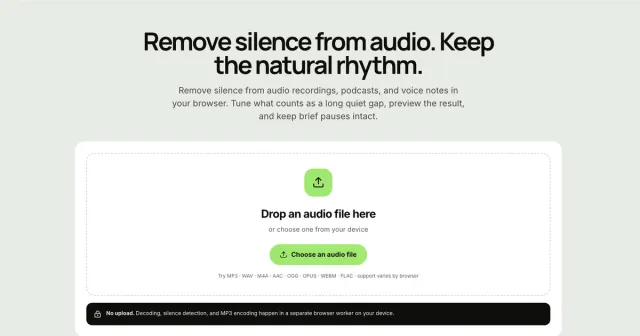
Remove Silence from Audio Online is a silence remover for trimming long pauses from spoken recordings in your browser. It lets you choose a file locally, adjust how quiet sections are detected, preview the edited result, and download a tighter MP3 without creating an account. The app is built for podcasts, voice notes, interviews, lectures, and other speech-heavy recordings where you want to keep the rhythm natural while cutting dead air.
What is Remove Silence from Audio Online
Remove Silence from Audio Online is a silence remover that runs in the browser and focuses on spoken audio. It processes one recording at a time, looks for sustained quiet sections, and trims them so the finished file feels more concise without sounding choppy. The app is aimed at people who want to remove silence from audio quickly, without installing software or sending a file to a server.
The tool supports common audio formats including MP3, WAV, M4A, AAC, OGG, OPUS, WEBM, and FLAC, although support varies by browser. According to the site, decoding, silence detection, and MP3 encoding happen in a separate browser worker on your device. That means the workflow stays local, and the page can remain responsive while the silence remover works.
Key features
Remove Silence from Audio Online centers on a few practical controls rather than a large editing suite. Those controls are enough to remove silence from audio while preserving timing that still sounds human.
- Local processing in the browser: the file is decoded and analyzed on your device, not uploaded to an application server.
- Quiet detection control: you can change the threshold that decides what counts as silence.
- Minimum silence setting: this helps avoid cutting every short pause in a conversation or narration.
- Pause padding: you can leave a small buffer around speech so words, breaths, and transitions do not sound abrupt.
- Preview before download: the app lets you listen to the processed version and compare it with the original before saving.
- MP3 export: the current output is a 128 kbps MP3 that you download directly from the browser.
These controls make the silence remover more suitable for spoken content than for music cleanup. The emphasis is on keeping natural pacing while reducing obvious dead air.
How to use it
The app follows a simple three-step flow to remove silence from audio online.
-
Choose one file Select an audio file from your device or drop it into the page. The app reads it locally and shows a playable waveform so you can inspect the recording before editing.
-
Tune the silence settings Start with the Balanced preset, then adjust the quiet threshold, minimum silence, or pause padding if needed. If the preview clips soft words, the threshold is probably too aggressive. If the result still leaves too much dead space, raise the settings gradually.
-
Preview and download Listen to the processed audio, compare it with the original, and save the result once the pacing feels right. The export is an MP3 file generated in your browser.
A good workflow is to make small changes first. When you remove silence from audio, tiny adjustments are often safer than broad cuts because speech recordings vary a lot in volume and noise floor.
Who it is for
This silence remover is a fit for anyone working with speech-first recordings.
- Podcasters and interview editors who want to remove silence from audio before detailed manual cleanup.
- Voiceover creators who want faster pacing between lines without changing the spoken performance.
- People making lectures, meetings, or voice notes tighter when the goal is clarity rather than heavy post-production.
- Anyone who prefers browser tools and does not want to upload recordings to a remote service.
It is especially useful when you need a quick first pass. The app can remove silence from audio recordings enough to make them easier to review, share, or further edit in another tool.
What to know before you use it
This silence remover is focused on detecting quiet gaps, not on cleaning every kind of audio problem. It does not remove hum, echo, room noise, breaths, filler words, or damaged speech. If your goal is restoration or noise reduction, you will need another tool.
A few practical limits matter as well:
- Browser support varies for decoding and export, so some formats may work better than others depending on your device.
- File length and memory use depend on your browser, operating system, codec, and available resources.
- Single-file workflow means you process one recording at a time rather than batching a folder of clips.
- Preview still matters because silence removal is never perfect across every noise floor, speaker style, or recording environment.
Use the official source or a full editor when the recording needs restoration, multitrack editing, or precise manual timeline work. This app is best when you mainly want to remove silence from audio, preserve natural timing, and export a cleaner MP3 with minimal setup.
If your file has useful pauses that carry meaning, be conservative with the controls. The best results usually come from the silence remover finding long gaps while leaving short, intentional breaks intact.
FAQ
What audio formats does Silence Remover support?
It supports MP3, WAV, M4A, AAC, OGG, OPUS, WEBM, and FLAC. However, actual playback and decoding depend on your specific browser and operating system.
Is Remove Silence from Audio Online free to use?
The pricing is unknown from the available source. The site says you can use the silence remover in your browser without creating an account.
Do I need to upload my files?
No. All decoding, silence detection, and MP3 encoding happen locally in a browser worker; your files remain on your device and are never sent to a server.
Does this app upload my audio file?
No, it processes audio locally in the browser. The source says decoding, silence detection, and MP3 encoding happen in a separate browser worker on your device.
Can I remove breaths or filler words?
No, Silence Remover only detects and removes sustained silent sections. It does not edit specific sounds like breaths, ums, or background noise.
Which audio formats can I remove silence from?
The app lists MP3, WAV, M4A, AAC, OGG, OPUS, WEBM, and FLAC support, but browser support varies. Actual playback and decoding depend on your browser and device.
Is the tool free?
Yes, Silence Remover is completely free and requires no account or payment.
What kind of recordings is this best for?
It is best for spoken audio such as podcasts, interviews, voice notes, lectures, and voiceovers. It is designed to remove silence from audio while keeping conversational pacing natural.
What quality is the downloaded MP3?
The output MP3 is encoded at 128 kbps, providing a good balance between file size and audio clarity.
What does it not do?
It does not remove background noise, echo, hum, breaths, filler words, or damaged speech. For restoration or detailed editing, you should use a dedicated audio editor.