
Rudoc
A compact Rust document converter for simple file conversion workflows.
About
Rudoc is a document converter built in Rust for lightweight file conversion workflows. It focuses on a narrow set of formats, runs as a single binary, and is meant for simple conversions rather than full publishing-grade document processing.
What is Rudoc
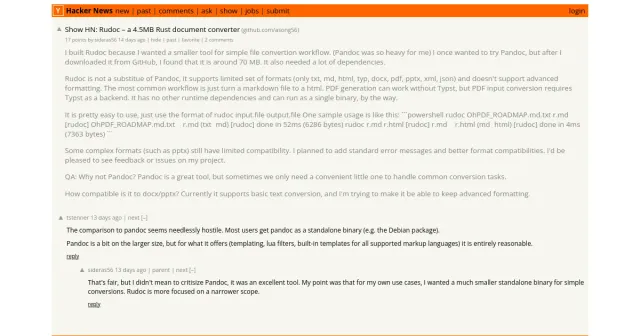
Rudoc is a small Rust document converter designed for straightforward format changes without the weight of a full document-processing suite. It was built for users who wanted a much smaller standalone binary than Pandoc for everyday conversion tasks.
The tool supports a limited set of formats: txt, md, html, typ, docx, pdf, pptx, xml, and json. Based on the project notes, the most common use case is converting a Markdown file into HTML. Rudoc is not positioned as a Pandoc replacement, and it does not aim to cover advanced formatting or broad template-based publishing workflows.
A few traits define the app clearly:
- it is written in Rust
- it ships as a single binary
- it has no other runtime dependencies
- it is intended for simple conversion commands
Key features
Rudoc centers on fast, local document translation between a small set of file types.
- Single-binary distribution: the project is built to run without extra runtime dependencies.
- Small footprint: the author specifically built it because existing tools felt heavy for the intended use case.
- Format support: it can work with txt, md, html, typ, docx, pdf, pptx, xml, and json.
- Simple command pattern: the expected usage is
rudoc input.file output.file. - Fast basic conversions: the example in the source shows txt→md finishing in 52 ms and md→html in 4 ms.
- PDF behavior: PDF generation can work without Typst, but PDF input conversion needs Typst as a backend.
- Focused scope: the tool is meant for common conversions, not advanced layout preservation.
There are also constraints that matter:
- pptx and other complex formats still have limited compatibility
- advanced formatting is not the goal
- format coverage is intentionally narrower than larger document conversion tools
How to use it
Rudoc follows a very direct command-line workflow. The basic pattern is to pass an input file and an output file, with the target format inferred from the output extension.
- Install or download the Rust binary for your environment.
- Open a terminal in the folder that contains the files you want to convert.
- Run a command in the form
rudoc input.file output.file. - Check the output file to confirm the conversion result.
- If you need PDF input conversion, make sure Typst is available as the backend.
A sample workflow from the source material looks like this:
- convert
OhPDF_ROADMAP.md.txttor.md - then convert
r.mdtor.html
That makes Rudoc useful for chained document conversion tasks, especially when moving between plain text, Markdown, and HTML. It may also handle office-style and structured formats, but the project notes make clear that compatibility is still limited for some of them.
Who it is for
Rudoc is a good fit for people who want a lightweight document conversion utility instead of a broad publishing toolkit.
- developers who need quick local format conversion
- users who mainly convert Markdown, HTML, and text files
- people who prefer a single executable with no extra runtime setup
- command-line users who value small binary size and simple syntax
- builders who only need basic text conversion from docx or pptx
It is less suitable for users who depend on:
- advanced document styling
- template systems
- filter pipelines
- high-fidelity office document reproduction
- full compatibility across many markup ecosystems
If your workflow is mostly about routine file translation, Rudoc fits that narrower job well. If your work depends on preserving complex layouts, embedded objects, or sophisticated formatting rules, a larger document conversion suite is likely a better match.
What to know before you use it
Rudoc is intentionally limited, and those limits are important before you rely on it in production or in polished publishing workflows.
- It is not a full substitute for Pandoc.
- It supports only a small group of formats.
- It does not aim to preserve advanced formatting.
- Some complex inputs, especially pptx, still have limited compatibility.
- PDF input conversion depends on Typst being available as a backend.
- The project notes mention plans for better error messages and improved compatibility, so behavior may change over time.
For that reason, Rudoc is best used when you need a practical document converter for common jobs, not when you need exhaustive edge-case handling. If your deliverable depends on strict fidelity, official exports from the source application or a more feature-rich converter may be the safer choice. Rudoc is strongest as a lightweight Rust document converter for everyday file-to-file transformations, and it is most appealing when simplicity matters more than breadth.
FAQ
What is Rudoc?
Rudoc is a lightweight document converter written in Rust that allows you to change file formats from the command line. It focuses on simple, common conversions with a minimal footprint of only 4.5MB and no external dependencies.
What is Rudoc used for?
Rudoc is used for simple document conversion between a small set of formats. The project highlights txt, md, html, typ, docx, pdf, pptx, xml, and json, with Markdown-to-HTML as the most common workflow.
How does Rudoc differ from Pandoc?
Rudoc is far smaller than Pandoc (4.5MB vs ~70MB) and requires no runtime dependencies, making it easier to install and run. However, it supports fewer formats and omits advanced features like templating and Lua filters, aiming for quick everyday tasks.
Is Rudoc free or open source?
The source material does not state a license or price, so its pricing is unknown from the available information. It is referenced with a GitHub repository, but that alone does not confirm licensing or commercial terms.
Which file formats can Rudoc convert?
Rudoc supports txt, md, html, typ, docx, pdf, pptx, xml, and json. Note that complex formatting in docx and pptx is only partially supported, and PDF input conversion requires the Typst backend.
Does Rudoc work as a Pandoc replacement?
No, Rudoc is not meant to replace Pandoc. It is a narrower tool for basic conversion tasks and does not support advanced formatting or the broader feature set that Pandoc offers.
Is Rudoc free to use?
Yes, Rudoc is completely free and open‑source. The source code is available on GitHub, and you can download and use the binary without any cost.
How do you run a conversion in Rudoc?
You run it with an input file and an output file, such as `rudoc input.file output.file`. The output extension determines the target format.
On which operating systems does Rudoc run?
Rudoc runs on Windows, macOS, and Linux as a standalone command‑line binary. There is no graphical interface; all interactions happen through the terminal.
What should I know about PDF and PPTX support?
PDF generation can work without Typst, but PDF input conversion requires Typst as a backend. PPTX support is available, though the project says compatibility is still limited for complex presentations.