Pixonara
Browse free AI image prompts, explore model styles, and create product visuals and reference-guided images.
About
Pixonara is an AI image prompt gallery for browsing free GPT Image and Nano Banana prompts, plus Midjourney and Seedance style ideas. It also supports image generation, video generation, and reference-guided product visuals, so you can move from inspiration to output in one place.
What is Pixonara
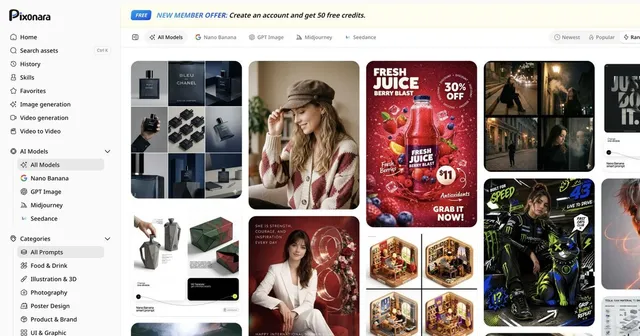
Pixonara is an AI image prompt gallery and creation workspace built around prompt browsing, model exploration, and visual generation. The site surfaces free prompts for GPT Image and Nano Banana, while also highlighting Midjourney and Seedance styles for users who want a faster way to discover looks, compositions, and use cases. In practice, Pixonara sits between a prompt library and an AI image generator, with extra pathways for product images and reference-guided visuals.
The home interface also points to image generation, video generation, and video-to-video tools, which suggests the app is intended as a broader visual workflow rather than a single-purpose prompt board. Pixonara appears to focus on helping users find prompt ideas first and then turn them into assets. That makes it useful for people who need an AI image prompt gallery as much as a generator.
Key features
Pixonara combines browsing and generation features in a way that is centered on visual content creation.
- Free prompt browsing for GPT Image and Nano Banana
- Style exploration for Midjourney and Seedance
- Categories for Food & Drink, Illustration & 3D, Photography, Poster Design, Product & Brand, and UI & Graphic
- Featured AI image prompts shown on the home page
- Support for product images and reference-guided visuals
- Image generation and video generation entry points
- AI model browsing, including an "All Models" view
- Sorting and discovery controls such as Newest, Popular, and Random
- Search access with a keyboard shortcut hint: Ctrl K
- Saved areas like History and Favorites
The prompt gallery is the main discovery layer. It includes prompt cards with visible examples and creator names, which can help users learn how different prompt styles are structured. For someone researching an AI image prompt gallery, this matters because the app is not only about output; it also shows how the prompt ecosystem is organized.
How to use it
- Open the Pixonara home page and start with the prompt gallery.
- Use search or the Ctrl K shortcut to find a theme, model, or visual style.
- Browse categories such as product, poster, photography, or illustration to narrow the AI image prompt gallery.
- Open a prompt card to inspect the example, style, and attribution.
- Switch to a model view like GPT Image, Nano Banana, Midjourney, or Seedance when you want model-specific inspiration.
- Use the generation entry points if you want to create an image or video after finding a prompt you like.
- Save useful ideas in Favorites or revisit them through History.
The workflow is straightforward for anyone who already knows they want an AI image prompt gallery. It starts with browsing, then narrows to a style or model, and finally moves into creation. Because the site exposes both prompts and tools, you can use Pixonara to compare visual directions before committing to a generation run.
Who it is for
Pixonara is a good fit for people who need fast visual inspiration and a practical AI image prompt gallery.
- Prompt writers looking for ready-made prompt examples
- Designers exploring product images, poster concepts, or UI graphics
- Marketers who need visual directions for brand or campaign assets
- Creators comparing styles across GPT Image, Nano Banana, Midjourney, and Seedance
- Users who want reference-guided visuals instead of starting from a blank page
- Teams that need an AI image prompt gallery for ideation before production
The app is especially relevant if you work with product detail images or white-background marketing imagery. Those use cases often benefit from examples, structured prompts, and reusable style references, which is exactly where an AI image prompt gallery can save time.
What to know before you use it
Pixonara is useful for discovery, but it is not a substitute for checking whether a prompt or generated asset meets your exact needs. The site shows prompt examples and model options, yet it does not promise that every result will be production-ready, brand-safe, or factually accurate. If you need exact dimensions, legal clearance, or a final asset for publication, review the output carefully.
A few practical caveats:
- The site’s source material does not show pricing, so pricing should be treated as unknown.
- Platform support is not clearly listed beyond the web app, so assume browser access unless the product says otherwise.
- Prompt browsing and generation can help with inspiration, but they do not guarantee consistent image quality across every model.
- If you need official brand assets, product photos, or regulated visuals, use approved source files or an official vendor workflow instead of relying only on the AI image prompt gallery.
- Reference-guided visuals can help steer composition, but they still depend on the underlying model and prompt quality.
For most users, Pixonara works best as a research and ideation tool first, then as an AI image prompt gallery and creation hub second. If your goal is to explore styles, collect prompt ideas, and move into generation quickly, the app is a strong starting point. If you need the final truth source for a product, brand, or compliance-sensitive image, verify elsewhere before publishing. The AI image prompt gallery is a useful accelerator, not the final authority.
FAQ
What is Pixonara?
Pixonara is an online AI image prompt gallery and generation platform. It allows you to browse a vast collection of prompts for models like GPT Image, Nano Banana, Midjourney, and Seedance, and generate images or videos directly.
Is Pixonara free to use?
The source material does not show pricing, so pricing is unknown. The site does advertise free GPT Image and Nano Banana prompts, but that is not the same as a confirmed free plan for every feature.
What platform does Pixonara run on?
Pixonara appears to be a web app. The available material points to browser-based access and does not list iOS, Android, or desktop apps.
Which AI models are supported?
Pixonara supports GPT Image, Nano Banana, Midjourney, and Seedance. These models cover a range of styles from photorealistic images to illustrative and animated visuals.
Can I use Pixonara for product images?
Yes, it explicitly highlights product images and product detail visuals. It also mentions white background images and reference-guided visuals, which fit e-commerce workflows.
What can I do in Pixonara besides browse prompts?
You can also access image generation, video generation, video-to-video, and model browsing. The site also mentions product images and reference-guided visuals.
Can I use generated images for commercial projects?
Usage rights depend on the specific AI model and its terms of service. Pixonara provides generation tools, but you should verify the licensing of each model’s outputs for commercial use.
Which AI models are included in Pixonara?
The site names GPT Image, Nano Banana, Midjourney, and Seedance. It also includes an All Models view for browsing across those options.
Who is Pixonara best suited for?
It is best suited for creators who want an AI image prompt gallery, especially designers, marketers, and prompt explorers. It is useful when you want examples before generating assets.
How do I generate an image on Pixonara?
Select an AI model like Midjourney or GPT Image from the sidebar, enter your text prompt or choose one from the gallery, and click generate. The platform then creates your image or video within seconds.
Who is Pixonara best for?
It is best for prompt writers, designers, marketers, and e-commerce teams. Anyone who needs prompt ideas plus a generation workflow in one place should find it useful.
Does Pixonara guarantee production-ready results?
No, it does not guarantee production-ready results. Like any AI image prompt gallery and generator, outputs still need review for quality, accuracy, and brand fit before use.