My Valentine
Create personalized romantic links with a name, a question, and a heartfelt message in seconds.
About
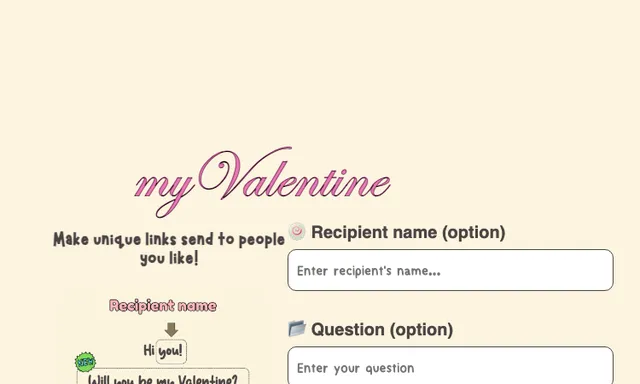
My Valentine is a romantic link generator that helps you create personalized Valentine-style pages in seconds. It lets you add an optional recipient name, a custom question, a second message, and even an extra link before you generate and copy a shareable URL. The experience is simple, playful, and built for sending a message to someone you like without setting up a full website.
What is My Valentine?
My Valentine is a romantic link generator that turns a few short prompts into a personalized page you can send to someone. It focuses on quick creation rather than complex design work, so the main task is building a custom Valentine message link that feels personal. The app’s own interface shows options for an optional recipient name, an optional question, a second message, and an optional added link, which suggests it is designed for simple one-off sharing rather than ongoing campaign management.
The result is a shareable URL you can copy and open directly in a browser. That makes My Valentine useful when you want a lightweight romantic link without editing code or building a landing page from scratch. In other words, it is a Valentine link maker built for speed, personalization, and easy sharing.
Key features
My Valentine keeps the feature set focused on a single use case: making a custom Valentine link.
- Optional recipient name field for addressing the person directly.
- Optional question field for the main prompt or proposal-style message.
- Optional second message field for adding a follow-up line, such as a longer note.
- Optional extra link field for attaching a URL alongside the message.
- Generate Link action that creates the shareable page.
- Copy link flow so you can send the finished result right away.
- Preview controls shown in the interface, which help you check the layout before sharing.
Because the app is centered on a romantic link generator, the value comes from speed and personalization rather than from a large library of templates. The interface text also suggests bilingual navigation elements, with English and Thai visible on the page, though the exact language support beyond that is unknown.
How to use it
Using this romantic link generator appears to be straightforward and form-based.
- Open the My Valentine page in your browser.
- Enter a recipient name if you want the link to feel more personal.
- Add a question if you want the page to ask something directly.
- Write a second message for a follow-up note or extra sentiment.
- Add an optional link if you want to include another destination.
- Click Generate Link to create the finished page.
- Copy the link and send it to the person you want to reach.
The site also shows preview navigation, so you may be able to review the page before you share it. That is especially helpful if you want to see how the romantic link generator handles your wording, spacing, and link placement.
Who it is for
My Valentine is for people who want a small, quick way to send a romantic page instead of a plain text message.
- People making a Valentine note for a crush, partner, or friend.
- Users who want a custom link with a personal name and message.
- Anyone who prefers a browser-based tool over design software.
- People who need something fast for a special occasion and do not want to build a full site.
- Users who want a playful, low-friction romantic link generator for sharing online.
It may also suit users who like simple web toys and one-page gifts, since the app is framed more like a lightweight creative experience than a formal productivity tool. If you only need a quick romantic link generator, the app’s narrow scope is an advantage.
What to know before you use it
My Valentine is intentionally simple, but there are practical limits to keep in mind.
- It does not appear to be a full relationship app, messaging platform, or dating service.
- The interface does not show advanced customization such as themes, analytics, or account management.
- The source text does not confirm whether links expire, can be edited later, or are private.
- The exact storage or backend behavior is unknown, so avoid putting sensitive personal information into the form.
- The app should not be treated as an official communication channel for serious commitments; for anything legal, private, or important, use a direct message or another trusted channel.
Since the app is a romantic link generator built for quick sharing, it works best for lighthearted messages and small surprise pages. If you need guaranteed delivery, access control, or proof that someone received the message, a standard messaging app or official communication method is a better choice. For casual personalization, though, My Valentine is a fast romantic link generator that does exactly one job and keeps the process easy.
FAQ
What does My Valentine do?
It creates a personalized romantic link that you can share with someone. The form supports an optional recipient name, a question, a second message, and an extra link before you generate the page.
Is My Valentine free to use?
The pricing is unknown from the source material. The site does not show a paid plan, so treat it as unconfirmed until you test the app or check the live page.
Do I need an account to make a link?
No account is shown in the available interface. The harvested site text only shows a form, preview, generate, copy, and open actions.
Can I use My Valentine on mobile?
It is available on the web, so you can open it in a mobile browser. The source does not mention native iOS or Android apps.
What platform is it on?
It is a web app. The official URL is hosted on Vercel, and the interface is accessed in a browser.
Does My Valentine let me edit the link after generating it?
That is not confirmed in the source material. The visible flow focuses on generating and copying a link, but it does not mention later editing or saved drafts.
Who is this app best for?
It is best for people who want a quick romantic share link rather than a full website. The app suits casual Valentine notes, playful reveals, and simple personal messages.
Who is My Valentine best for?
It is best for people who want a quick Valentine-style message page. It suits casual sharing, small surprises, and playful romantic notes more than formal or long-term projects.