just talk english
Free AI voice chat from babel.town, built for quick spoken practice in English.
About
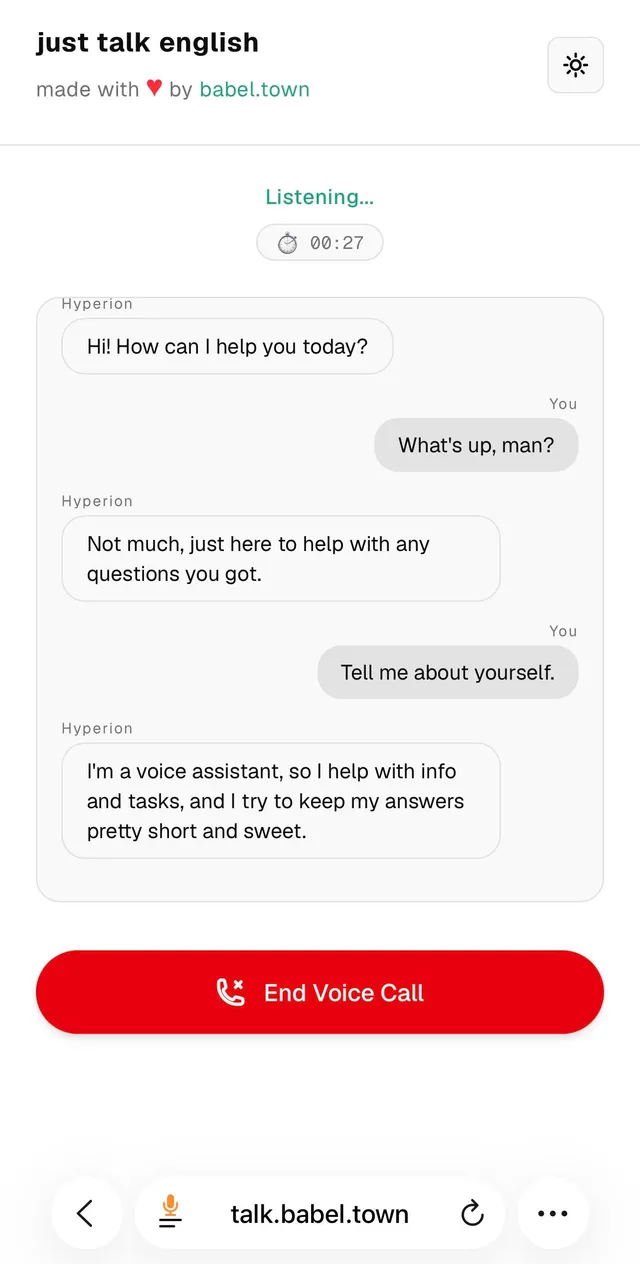
just talk english is an AI voice chat app for spoken English practice in the browser. It offers a free voice call experience from babel.town, with a simple prompt to start talking and practice English aloud without installing software.
What is just talk english
just talk english is an AI voice chat tool that lets you start a spoken English conversation from the web. The app is presented as a free service from babel.town, and the main action on the site is a voice call. That makes it a lightweight AI voice chat option for people who want to speak English instead of only typing.
Because the public site copy is very short, the safest description is also narrow: this is a browser-based AI voice chat experience focused on English practice. It is not positioned as a general-purpose calling app, a meeting platform, or a full language course. The value is in the simplicity of opening the site and talking.
Key features
The AI voice chat setup appears to be intentionally minimal, which can be useful when you want to get into speaking practice fast.
- Free access is explicitly mentioned on the site.
- Voice call mode is the main interaction, so the app centers on spoken back-and-forth rather than text-only chat.
- Browser access means there is no evidence of a required desktop install.
- The interface appears simple enough to jump into without an onboarding flow.
- The product is branded by babel.town, which suggests it is part of a small, creator-built project rather than a large language-learning suite.
For a user, that means the AI voice chat experience is probably best understood as a fast practice tool: open the page, start a call, and speak English.
How to use it
Using this AI voice chat app should be straightforward based on the public homepage copy.
- Open https://talk.babel.town in a browser.
- Look for the Start Voice Call action on the page.
- Begin speaking in English once the call starts.
- Use the conversation to practice pronunciation, fluency, and quick responses.
- Refresh or end the session if you want to start over.
A practical way to get more from the AI voice chat is to treat it like a short speaking drill. You can introduce yourself, answer everyday questions, or rehearse a topic you want to say aloud. Since the app description does not mention saved transcripts, lesson plans, or user accounts, it is best approached as an instant voice practice session rather than a managed classroom tool.
Who it is for
This AI voice chat is a fit for people who want a low-friction way to speak English more often.
- English learners who want extra speaking practice outside class.
- Self-study users who prefer talking over typing.
- People who want a quick AI voice chat session without signing up for a complex platform.
- Users who value a free tool and are okay with a very lightweight feature set.
It may also appeal to teachers or tutors looking for a simple demo they can point students to, but there is no evidence of class management, admin controls, or lesson tracking. If you need those, this app is probably too minimal.
What to know before you use it
There are a few important caveats before you rely on this AI voice chat app.
- The site only clearly states that the service is free and made by babel.town; it does not spell out limits, quotas, or whether free access will remain available.
- There is no public evidence of a mobile app, API, or offline mode.
- The site copy does not explain whether conversations are saved, exported, or reviewed.
- Like any AI voice chat system, it may misunderstand accents, fast speech, slang, or background noise.
- It should not replace a certified tutor, a formal course, or an official assessment if you need guaranteed scoring or instruction.
If you are using this AI voice chat for language practice, keep your expectations simple: it is a fast way to speak English with an AI conversation partner, not a complete learning platform. For sensitive, graded, or high-stakes language needs, use an official teacher-led source instead. The strongest use case is casual speaking practice, and that is where this AI voice chat is most likely to help.
FAQ
Is Just Talk English free?
Yes, the site says the service is free. It also notes that it is available "while it lasts," so the offer may change.
Is just talk english free?
Yes, the site explicitly says the service is free. It also adds a note that availability may change, so it is smart to use it while it is offered.
What platform does Just Talk English run on?
It runs on the web. The official site presents it as a browser-based voice chat experience.
What does just talk english do?
It provides an AI voice chat for spoken English practice. The main action on the site is to start a voice call and talk.
Who is Just Talk English for?
It is for people who want to practice spoken English with an AI conversation partner. That makes it most useful for learners working on fluency and confidence.
Do I need to install anything to use it?
No, it appears to run in the browser. The public page only shows a web-based voice call flow, with no mention of a desktop or mobile install.
How do I start using it?
You start by choosing the voice call option on the site. The homepage includes a "Start Voice Call" action to begin the chat.
Who is this app best for?
It is best for English learners who want quick speaking practice. The app looks simple and lightweight, so it suits casual practice more than formal lessons.
Does it replace a tutor or language course?
No, it does not appear to be a full learning platform. Use it for practice, but rely on a tutor, course, or official assessment source when you need structured teaching or grading.