
ArchVizr
AI architectural rendering from sketches, SketchUp, Revit, or CAD exports.
About
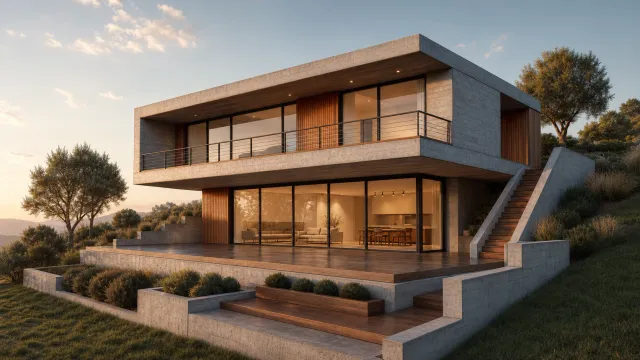
ArchVizr is an AI architectural rendering tool that turns your drawing into photoreal images. Upload a SketchUp, Revit, CAD, sketch, or massing export and get a render back in as little as 20 seconds, with the first one free. It is built for architects and designers who want a fast way to produce consistent exterior, interior, landscape, and photorealistic views from the same source geometry.
What is ArchVizr
ArchVizr is an AI architectural rendering platform that generates photoreal images from a drawing rather than from a loose prompt. It is designed around architectural workflows, so the same upload can produce a coherent set of views instead of a single isolated image. The site says you can upload a SketchUp, Revit, or CAD export, and it can return a photoreal architectural rendering in as little as 20 seconds. The first render is free, which makes it easy to test the AI architectural rendering flow before committing to more work.
The product is positioned for people who already have geometry in hand and want the AI architectural rendering step to sit on top of that work. That matters because ArchVizr emphasizes that it keeps the same massing, camera, and framing intact while changing material, light, and atmosphere. In other words, it is not trying to redesign the project; it is trying to visualize the project more convincingly.
Key features
ArchVizr focuses on architectural rendering rather than generic image generation. The core features shown on the site include:
- Sketch to render: a hand sketch, hidden-line export, or massing screenshot can be turned into a photoreal result.
- Exterior rendering: test brick, cedar, corten, white render, and other facade directions on the same building.
- Interior rendering: carry the exterior palette into lobbies, atria, and show units.
- Landscape rendering: show planting, paving, and boundary treatment so the project reads as a place, not just a plot.
- Photorealistic rendering: shift the mood between golden hour, overcast, blue hour, and night without redrawing the model.
- Style transfer from references: a photo or moodboard can influence the palette, including a watercolor architectural rendering look for competition boards.
- Consistent output sets: the app is built to produce multiple frames from one upload so a client presentation or planning pack stays visually aligned.
The AI architectural rendering approach also preserves practical drawing details. The site specifically says windows and camera position stay where they were drawn, which is useful when a team needs fidelity rather than a loose artistic interpretation.
How to use it
Using ArchVizr appears straightforward, and the AI architectural rendering flow is centered on one source file.
- Upload an existing drawing, such as a SketchUp, Revit, or CAD export.
- Or start with a sketch, hidden-line export, massing image, or screenshot if that is what you have.
- Choose a render direction, such as exterior, interior, landscape, or a photorealistic architectural rendering.
- Optionally supply a reference image or moodboard to guide the palette and surface treatment.
- Generate the first image, which the site says is free.
- Queue more views from the same drawing if you want a consistent set for a deck, submission, or client review.
Because ArchVizr keeps the same geometry and camera, the AI architectural rendering process works best when your source file is already close to the intended composition. The app is built to save time on visualization, not to rebuild the model from scratch.
Who it is for
ArchVizr is best for people who need architectural rendering outputs quickly and want them to match an existing design file. That includes:
- Architects preparing client presentations, design reviews, or planning submissions.
- Interior designers who need coordinated interior rendering images from the same project language.
- Visualization teams looking for a faster first pass before more detailed post-production.
- Students and competition entrants who want a clear sketch to render workflow.
- Developers and project teams who need multiple views that stay visually consistent.
The AI architectural rendering tool is especially relevant when one view is not enough. If you need six frames that agree with each other, ArchVizr’s set-based approach is a stronger fit than tools that only optimize for a single dramatic image.
What to know before you use it
ArchVizr is useful, but it is not a substitute for source-file accuracy or final documentation. The AI architectural rendering output depends on the quality of the upload, and the site does not claim to fix broken geometry, missing context, or unclear camera setup. If your drawing is incomplete, the result can still look polished while carrying those upstream issues forward.
A few practical caveats matter:
- It does not appear to replace CAD or BIM software; it works from those exports.
- It does not promise a fully manual art-directed retouch for every frame.
- It is better for visualization than for legal, permit, or construction-grade drawings.
- Reference-image style transfer can guide the palette, but it should not be treated as a guarantee of exact material accuracy.
- For official dimensions, coordination, and compliance, use the original SketchUp, Revit, CAD, or permit documents instead of the render alone.
If your goal is a fast AI architectural rendering that keeps the original building geometry intact, ArchVizr is a focused option. If your goal is final documentation, the source model and official drawings should remain the authority, while ArchVizr handles the presentation layer of the AI architectural rendering workflow.
FAQ
What does ArchVizr cost?
The first render is free. For additional renders and advanced features, ArchVizr likely offers paid plans, though exact pricing is not disclosed on the site.
How much does ArchVizr cost?
Your first render is free; after that, ArchVizr offers paid plans based on rendering credits or subscriptions. Specific pricing details are available on the website.
Is ArchVizr free to try?
Yes, the first render is free. The site explicitly says “first free,” but it does not show full pricing details in the provided material.
What file types can I upload?
You can upload exports from SketchUp, Revit, or CAD software. The platform accepts common drawing formats such as .skp, .rvt, or .dwg files.
What file formats can I upload?
ArchVizr supports common architectural export formats, including SketchUp, Revit, and CAD files (e.g., .dwg, .dxf). Check the upload dialog for the full list of accepted types.
What file types can I upload to ArchVizr?
You can upload SketchUp, Revit, or CAD exports. The site also mentions sketches, hidden-line exports, massing screenshots, and a drawing you already have.
How fast are the renderings?
Renderings are typically returned in as little as 20 seconds, allowing rapid iteration and client-ready images almost instantly.
Does ArchVizr preserve my original design?
Yes, the AI rendering keeps your geometry intact—it does not move windows, change massing, or alter camera positions. It only adds realistic materials and lighting.
Does ArchVizr keep my original camera and geometry?
Yes, that is one of its main selling points. The product says the same geometry and camera are preserved across the whole set, and that windows stay where you drew them.
Can I customize materials and lighting?
Yes. You can choose from a palette of materials like concrete, brick, wood, or metal, and adjust lighting conditions to golden hour, blue hour, overcast, or night—all without altering your base model.
How fast are the renders?
Renders are typically returned in as little as 20 seconds, depending on complexity and server load.
Who should use this AI architectural rendering tool?
Architects, interior designers, students, and project teams are the strongest fit. It is aimed at people who need fast presentation renders from an existing design file.
Is ArchVizr suitable for professional use?
Absolutely. It's designed for architects, planners, and designers who need consistent, presentation-quality renders for client meetings, planning submissions, and competition boards.
Can I use ArchVizr for both interior and exterior scenes?
Absolutely. ArchVizr supports interior, exterior, and landscape renderings, all from the same drawing upload, ensuring a consistent look across your project.
Can I use ArchVizr instead of CAD or BIM software?
No, it is not a replacement for CAD or BIM authoring tools. It works from those exports and is meant for visualization, not for drafting or coordination.